Ad extensions – what are they and what do they do?
Now that you have been shown how to set up a campaign with keywords and Ad copy in previous posts it is time to discover the wonders of...


Now that you have been shown how to set up a campaign with keywords and Ad copy in previous posts, it is time to discover the wonders of Ad Extensions.
Firstly, you might ask what Ad Extensions are and why you should care. Well, Ad Extensions add an extra layer of depth to your ad when it appears on the search engine results page by providing additional ways to interact with it and increasing the space it occupies, making it more visible and eye-catching. This naturally has the knock-on effect of boosting your ad's click-through rate.
Ad Extensions are set at either the Campaign or Ad Group level and apply to all ads in those Campaigns or Ad Groups. The locations for them can be found in the Campaign or Ad Group menu bar next to Audiences.

Sitelink Extensions
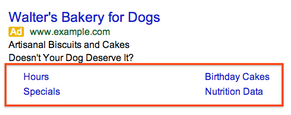
The most common and one of the oldest forms of Ad Extensions is the Sitelink. This Ad Extension allows up to six additional links to the site to be shown below the Ad. These only appear when your ad is in the top three positions, and each has to link to a landing page other than the one the main ad copy links to. These can be used to highlight additional products or perhaps links to further information about the service you are offering. The example below from Google illustrates how they appear in your ad when visible.
Location Extension
This is for a business that wishes to make its address available, which can be very useful for a shop or office that offers a service. If you use Location Extensions, they can show your business address, phone number, and a map marker with the ad. On mobile ads, this includes a link with directions to your business, which can be very useful since it helps customers find you more quickly and easily. To set this up, you will need to have a Google My Business account (formerly known as Google Places) already, which will need to be linked to your AdWords account.

Call Extension
This is a quick extension to set up, and it is as simple as entering your phone number. This will display the click-to-call option on a mobile ad, which is essentially a button on the side of the ad that will dial the number on your phone when viewed and clicked on your cell phone.

App Extension
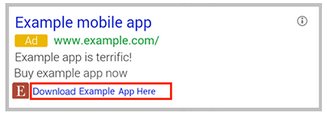
This is for a business that has a mobile app available for smartphones and you are interested in having customers download it. The link appears directly below your ad and it sends people directly to the app store or begins downloading the app. With more and more business’s looking to create their own apps for smartphones to provide more information for their customers or make their purchases easier this extension is quickly becoming more common.
Review Extension
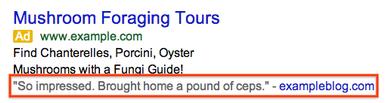
This is a relatively new option and a great way to extend the ad copy by quoting a positive comment about your company or product from a professional reviewer. As you can see in the example, it appears below the site, and you can use up to 67 characters for the quote along with the name of the source. There are a few rules which need to be followed, such as how you cannot use individual personal reviews. They have to be from a publication or organisation, as anyone could write a personal review of the company. The review needs to be no older than one year, and the extension has to quote the review correctly. The extension links to the original reviewer location so that users can read it for themselves.
These are the most common Ad Extensions currently; however, Google is always looking to add to these, so do keep an eye out for any AdWords updates.
Cheers for now,
Meyrick
Loved the read? Get the speed to match.
Check Fibre & Fixed Wireless coverage at your address in seconds.
More in General
View all →
The Ultimate Household Internet Olympics: Who Uses the Most Data?
Welcome to the Household Internet Olympics, where the competition is fierce, the WiFi is busy, and everyone claims they're "hardly using any data." 😅

Level up your game with Fibre that can keep up
Every dropped packet. Every endless loading screen. Every disconnect right before you clutch the win. It’s frustrating. When you’re gaming online, milliseconds matter...